Showing posts with label Ubuntu/Linux News. Show all posts

Monday, October 17, 2011

Ubuntu 11.10 (Oneiric Ocelot) Linux distro Released

"There is nothing like a dream to create the future." - Victor Hugo

The Ubuntu team is pleased to announce Ubuntu 11.10, code-named "Oneiric Ocelot". 11.10 continues Ubuntu's proud tradition of integrating the latest and greatest open source technologies into a high-quality, easy-to-use Linux distribution.

For PC users, Ubuntu 11.10 supports laptops, desktops and netbooks with a unified look and feel based on an updated version of the desktop shell called "Unity", which introduces specialized "Lenses". Finding and installing software using the Ubuntu Software Centre is now easier thanks to improvements in speed, search functionality enhancements, and usability improvements. Aside from updates on the performance side, it's also more aesthetically appealing.

Ubuntu Server 11.10 has made it much easier to provision, deploy, host, manage, and orchestrate enterprise data centre infrastructure  services with the introduction of "Orchestra".  The Juju technical preview allows service developers to describe the deployment and  scaling requirements of their applications, in order to simplify  and enhance the dialogue between developers and operations teams. For those working on the ARM architecture, a technical preview is  also provided for the ARM server.

Read more about the new features of Ubuntu 11.10 in the following press releases:

  http://www.canonical.com/content/transforming-home-pc-ubuntu-1110
  http://www.canonical.com/content/client-cloud-ubuntu-1110-sets-pace-business-it


Standard maintenance updates will be provided for Ubuntu 11.10 for  18 months, through April 2013.

Thanks to the efforts of the global translation community, Ubuntu is now available in 38 languages.  For a list of available languages  and detailed translation statistics for these and other languages, see:

  http://people.canonical.com/~dpm/stats/ubuntu-11.10-translation-stats.html


Ubuntu 11.10 is the base for the newest 11.10 iterations of Kubuntu, Xubuntu, Edubuntu, Mythbuntu, Ubuntu Studio, and our newest addition  to this release cycle, Lubuntu!

Kubuntu:       http://kubuntu.org/news/11.10-release
Xubuntu:       http://xubuntu.org/news/11.10-release
Edubuntu       http://edubuntu.org/news/11.10-release
Mythbuntu:     http://mythbuntu.org/11.10/release
Ubuntu Studio: https://wiki.ubuntu.com/UbuntuStudio/11.10release_notes
Lubuntu:       https://wiki.ubuntu.com/Lubuntu/Announcement/11.10


Ubuntu 11.10 is also now available on two new ARM community-supported ports.
AC100 (Toshiba Tegra 2 Netbook): https://wiki.ubuntu.com/ARM/TEGRA/AC100
MX5
(Freescale i.MX53 QuickStart): https://wiki.ubuntu.com/ARM/MX5


To get Ubuntu 11.10

In order to download Ubuntu 11.10, visit:

 http://www.ubuntu.com/download/ubuntu/download


Users of Ubuntu 11.04 will be offered an automatic upgrade to 11.10 via Update Manager. For further information about upgrading, see:

 http://www.ubuntu.com/download/ubuntu/upgrade


As always, upgrades to the latest version of Ubuntu are entirely free of charge.

We recommend that all users read the release notes, which document caveats, workarounds for known issues, as well as more in-depth notes on the release itself. They are available at:

 http://www.ubuntu.com/getubuntu/releasenotes


Find out what's new in this release with a graphical overview:

 http://www.ubuntu.com/ubuntu/whats-new
 http://www.ubuntu.com/ubuntu/features


If you have a question, or if you think you may have found a bug but aren't sure, you can try asking in any of the following places:

 #ubuntu on irc.freenode.net
 http://lists.ubuntu.com/mailman/listinfo/ubuntu-users
 http://www.ubuntuforums.org/
 http://askubuntu.com/


Help Shape Ubuntu

If you would like to help shape Ubuntu, take a look at the list of ways you can participate at:

 http://www.ubuntu.com/community/participate/


About Ubuntu

Ubuntu is a full-featured Linux distribution for desktops, laptops, netbooks and servers, with a fast and easy installation and regular releases.  A tightly-integrated selection of excellent applications is included, and an incredible variety of add-on software is just a  few clicks away.

Professional services including support are available from Canonical and hundreds of other companies around the world.  For more information about support, visit:

 http://www.ubuntu.com/support

Kate Stewart,
on behalf of the Ubuntu Release Team

More Information

You can learn more about Ubuntu in Ubuntu Unleashed 2011 Edition: Covering 10.10 and 11.04 (6th Edition) !

Tuesday, June 21, 2011

Firefox 5.0 Final Web Browser for Linux/Ubuntu Released


Ladies and gentlemen, a few minutes ago (June 20th) Mozilla unleashed the stable version of the highly anticipated Mozilla Firefox 5.0 web browser for Linux, Windows and Macintosh operating systems.

Yes! The final version of Firefox 5 is finally here, and it brings support for CSS animations, which will lead to amazing Web experiences. It also brings Location-Aware Browsing, channel switcher, performance and stability enhancements, and much more.

Mozilla Firefox 5.0 is supported on both 32-bit and 64-bit architectures, which means that it will run on any Linux distribution. However, Ubuntu 11.04 users will get a Firefox update on the official channels, very soon. Power up your Ubuntu 11.04 with Ubuntu Unleashed 2011 Edition: Covering 10.10 and 11.04 (6th Edition).

Mozilla Firefox 4.0 will no longer be updated, it will be replaced by the new Firefox 5.0, which in time will become Firefox 6, Firefox 7, and so on.

Highlights of Mozilla Firefox 5.0:

· Firefox channel switcher;
· Location-Aware Browsing;
· Support for CSS animations;
· Increased discoverability by using the Do-Not-Track header preference;
· Improved canvas;
· Improved JavaScript;
· Improved memory usage;
· Improved networking performance;
· Better spell checking;
· Better desktop environment integration;
· Better standards support for HTML5, MathML, SMIL, canvas, and XHR;
· Improved performance for background tabs;
· Overall performance and stability enhancements.

These are just a few of the nice features that Mozilla Firefox 5.0 will bring on your desktop. If you want to learn more about the new additions, changes from previous versions and other improvements, do not hesitate to visit the official Firefox 5.0 website.

We've tested the new Mozilla Firefox 5.0 web browser on the Ubuntu 11.04 (Natty Narwhal) operating system.
Find tips to optimize your Ubuntu 11.04 in Ubuntu Unleashed 2011 Edition: Covering 10.10 and 11.04 (6th Edition) !

What are you waiting for? Grab Mozilla Firefox 5.0 binaries for Linux (32-bit and 64-bit) right now from Softpedia. Oh, and don't forget to visit our always up-to-date Firefox Extensions section for the latest add-ons!

Source: Softpedia

Thursday, April 28, 2011

Ubuntu 11.04 "Natty Narwhal" Linux OS Released

"Form and function are a unity, two sides of one coin. In order to enhance function, appropriate form must exist or be created."
   -Ida P. Rolf

The Ubuntu team is pleased to announce Ubuntu 11.04, code-named "Natty Narwhal". 11.04 continues Ubuntu's proud tradition of integrating the latest and greatest open source technologies into a high-quality, easy-to-use Linux distribution.

To learn more about Ubuntu, check out Beginning Ubuntu Linux book from Apress.

For PC users, Ubuntu 11.04 supports laptops, desktops and netbooks with a unified look and feel based on a new desktop shell called "Unity". This version supersedes Ubuntu Netbook Edition for all PC netbooks.

Developer reference images are provided for select Texas Instruments (TI) ARM platforms, specifically the "PandaBoard" and "BeagleBoard".

Ubuntu Server 11.04 has made it easier to provision servers, and reduce power consumption.   Ubuntu Server 11.04 for UEC and EC2 has a new kernel and improved initialization and configuration options.

Read more about the features of Ubuntu 11.04 in the following press releases:

 http://www.canonical.com/content/ubuntu-transforms-your-pc-experience
 http://www.canonical.com/content/latest-ubuntu-offers-business-added-cloud-features-and-sleek-new-desktop-interface

 Standard maintenance updates will be provided for Ubuntu 11.04 for 18 months, through October 2012.

Thanks to the efforts of the global translation community, Ubuntu is available in 43 languages.  For a list of available languages and detailed translation statistics for these and other languages, see:

 http://people.canonical.com/~dpm/stats/ubuntu-11.04-translation-stats.html

Ubuntu 11.04 is also the basis for new 11.04 releases of Kubuntu, Xubuntu, Edubuntu, UbuntuStudio, and Mythbuntu:

       Kubuntu  http://kubuntu.org/news/11.04-release
       Xubuntu  http://xubuntu.org/news/11.04-release
      Edubuntu  http://edubuntu.org/news/11.04-release
     Mythbuntu  http://mythbuntu.org/11.04/release
 Ubuntu Studio  https://wiki.ubuntu.com/UbuntuStudio/11.04release_notes

To Get Ubuntu 11.04

To download Ubuntu 11.04, or obtain CDs, visit:

 http://www.ubuntu.com/download/ubuntu/download

Users of Ubuntu 10.10 will be offered an automatic upgrade to 11.04 via Update Manager. For further information about upgrading, see:

 http://www.ubuntu.com/download/ubuntu/upgrade

As always, upgrades to the latest version of Ubuntu are entirely free of charge.

We recommend that all users read the release notes, which document caveats and workarounds for known issues.  They are available at:

 http://www.ubuntu.com/getubuntu/releasenotes

 Find out what's new in this release with a graphical overview:

 http://www.ubuntu.com/ubuntu/whats-new
 http://www.ubuntu.com/ubuntu/features

If you have a question, or if you think you may have found a bug but aren't sure, you can try asking in any of the following places:

 #ubuntu on irc.freenode.net
 http://lists.ubuntu.com/mailman/listinfo/ubuntu-users
 http://www.ubuntuforums.org/
 http://askubuntu.com/


Helping Shape Ubuntu

If you would like to help shape Ubuntu, take a look at the list of ways you can participate at:

 http://www.ubuntu.com/community/participate/


About Ubuntu

Ubuntu is a full-featured Linux distribution for desktops, laptops, netbooks and servers, with a fast and easy installation and regular releases.  A tightly-integrated selection of excellent applications is included, and an incredible variety of add-on software is just a few clicks away.

Professional services including support are available from Canonical and hundreds of other companies around the world.  For more information about support, visit:

 http://www.ubuntu.com/support

More Information

To learn more about Ubuntu, check out Beginning Ubuntu Linux book from Apress.

You can find out more about Ubuntu and about this release on our website:

 http://www.ubuntu.com/

To sign up for future Ubuntu announcements, please subscribe to Ubuntu's very low volume announcement list at:

 http://lists.ubuntu.com/mailman/listinfo/ubuntu-announce/


Kate Stewart,
on behalf of the Ubuntu Release Team

(copied mostly verbatim from Ubuntu announcement)

Sunday, October 10, 2010

Ubuntu 10.10 Maverick Meerkat Has Been Released - See What's New In Both Desktop And Netbook Editions [WebUpd8]

Ubuntu perfect 10

Ubuntu 10.10 Maverick Meerkat final has just been released. I'm taking this opportunity to review the major changes (mostly on the UI) in both Ubuntu 10.10 Desktop and Netbook editions. If you're a regular WebUpd8 reader, you should already know all these changes but even so, read on for a new Unity video (recorded today) as well as a recap of the changes to Ubuntu Software Center, Unity and so on. 

Please note that as usual, the Netbook Edition video and screenshots have been taken on my desktop - that's because I personally do not like Unity and prefer my own netbook setup, but it has nothing to do with the Unity performance (which by the way works great now).


Ubuntu 10.10 Maverick Meerkat Desktop Edition

Ubuntu Software Center Ubuntu Software Center has got a lot of changes in Ubuntu 10.10 Maverick Meerkat:

- A new look:

Ubuntu 10.10 Software Center

In the above screenshot you can also spot the "What's new" category which will hold new applications (application which are not available in the Ubuntu 10.10 official repositories at the Ubuntu 10.10 release date but are made available later on).

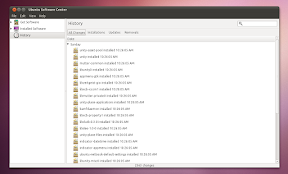
- A history tab shows what applications you've installed, removed or upgraded, day by day:

Ubuntu 10.10 maverick meerkat screenshots

- A feature called "Where is it" displays the menu entry where you can find the newly installed applications. Also, for applications which have some plugins available, these are displayed below the application in the Ubuntu Software Center:

Ubuntu 10.10 maverick meerkat screenshots

- The first paid application is available in Ubuntu Software Center in Ubuntu 10.10:

Ubuntu Software Center paid app

Yes, only one application for now - for testing purposes, but more are expected starting with Ubuntu 11.04 Natty Narwhal.

- Ubuntu Software Center now also handles .deb file installation (so when you double click a .deb file, it opens in Ubuntu Software Center).

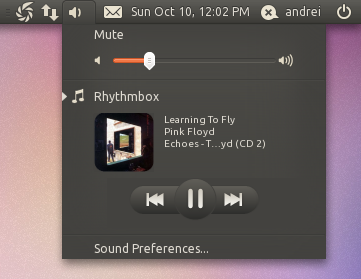
Sound menu
Ubuntu 10.10 screenshots sound menu

Ubuntu 10.10 Maverick Meerkat comes with a new sound menu which by default displays the currently playing song in Rhythmbox, the album art (if the respective plugin has been enabled in Rhythmbox) and controls for previews / next tracks as well as play / pause. Other music players will be able to take advantage of this new Sound Menu, like Banshee (already available through an extension), Amarok and so on.

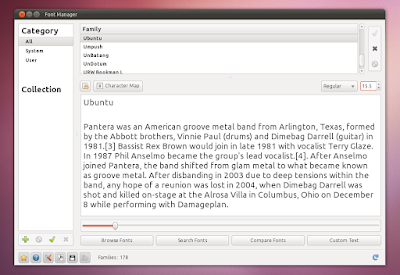
Ubuntu Font Familiy as the default desktop font
Ubuntu 10.10 screenshots font

The Ubuntu Font Family, which has been in private beta for almost the whole Ubuntu 10.10 development has been made the default desktop font. The font is default for Application, Window title, and Desktop only and the size has been set to 11.

This change should be available in all the Ubuntu flavors: from Ubuntu 10.10 Netbook Edition to Kubuntu and so on.

F-Spot out, Shotwell in
Shotwell

F-Spot photo manager has been replaced in Ubuntu 10.10 Maverick Meerkat with Shotwell. Among Shotwell's features are tags and ratings support, basic editing like cropping, red-eye and color adjustments and publishing images to Facebook, Flickr and PicasaWeb.


Ubuntu One Ubuntu One has got lots of improvements, most under the hood, but there's one in particular that is worth mentioning: you can now stream music to your Android or iPhone. The applications for Andoid and iPhone are currently not available (they are in beta), but here is a screenshot thanks to Lifehacker:
Ubuntu One Andoid App


Light Themes (Ambiance and Radiance) There weren't major changes to the Ubuntu "Light" themes, but they did get some further polishing. Futher more, Radiance has been tweaked to look like it was initially intended: a lighter version of Ambiance, not a separate theme.

Ubuntu 10.10 Ambiance theme screenshot

(Ambiance - the default Ubuntu 10.10 theme)


Ubuntu 10.10 Radiance theme

Radiance

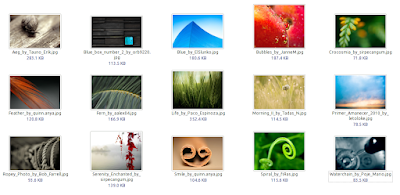
Wallpapers Like with every new Ubuntu release, Maverick Meerkat too got a new default wallpaper:

Ubuntu 10.10 default wallpaper

And of course, new community wallpapers:

ubuntu 10.10 screenshot


Revamped installer
Ubuntu 10.10 installer

The Ubuntu installer got a new look, new slideshow and along with these, some new features:

- It can now install mp3 playback support so you can have that from your first Ubuntu login. You'll need a working internet connection for that though:

Ubuntu 10.10 screenshots installer

- Once you select the partition where you want to install Ubuntu, the formating and installation begins. So the installation takes place while you complete the rest of the process like selecting your location or entering your password thus the time required to install Ubuntu has decreased by simply changing the order installer steps order:

Ubuntu 10.10 maverick meerkat screenshots

Here is a video (1 week old, but everything is the same in the final release) with the whole Ubuntu 10.10 Maverick Meerkat installation process I've recorded:


Ubuntu 10.10 Maverick Meerkat Netbook Edition (Unity) For Ubuntu 10.10 Maverick Meerkat Netbook Edition, everything is new compared to 10.04. Unity has replace the old Netbook interface and along with it, there are some other features designed to improve the usability on a netbook.

Unity comes with a launcher on the left side of the screen - it allows you to pin applications and it comes with some applets by default like a trash applet and a workspace switcher applet. It also has 2 quick access applets for the applications and files views (called Dash):


Ubuntu 10.10 netbook edition screenshot

(Unity launcher)


Unity workspaces

(Unity - workspaces)


Ubuntu 10.10 Unity interface

(Unity - applications pane)


Unity Ubuntu 10.10 files

(Unity - files pane (Dash))

The files and applications pane use Zeitgeist for displaying the recently used and most used items. The files are organized by type and date they were last accessed (as you can see in the screenshot above).

Clicking the Ubuntu logo in the top left corner will open the main application categories:

Ubuntu 10.10 Unity screenshot

Ubuntu 10.10 Netbook Edition also comes with an Applications Menu - the applications menu is now displayed on the top panel (which by the way does not support any kind of customization, you can't remove or add applets - and it's not like in 10.04 when the panel was locked, now the panel itself doesn't support any customizations) and is not displayed in the actual applications anymore (Mac OSX style):

Ubuntu 10.10 screenshots

This however does not work for some applications like Firefox, Thunderbird, OpenOffice and so on.

Also, the maximize applications titlebar is automatically removed and the window title along with the close, minimize and maximize buttons are also displayed on the top panel:

Ubuntu 10.10 netbook edition unity

All these are designed to provide more vertical space for netbooks.


You can't really get an idea on what Unity is from the screenshots, so I've recoded a video with Ubuntu Netbook Edition 10.10 Maverick Meerkat final:


(Video available in HTML 5 if you've enabled it on YouTube - watch it in HD!)


Multi touch out of the box
Ubuntu 10.10 multitouch

If you have a multi-touch capable device, expect an out-of-the-box touch experience that "just works" on Ubuntu 10.10 Maverick Meerkat. This is installed by default in Ubuntu 10.10 Maverick Meerkat Netbook Edition but you can install it on the desktop edition too (sudo apt-get install utouch).

Here is an old video (sorry, I don't have a multi-touch device to record a video myself) with this amazing feature - for an application which doesn't support multi-touch by default (Inkscape):


And of course, there are new versions for each application like Evolution 2.30.3 (even though Ubuntu 10.10 ships with GNOME 2.32.0), OpenOffice 3.2.1, Empathy 2.32.0 (with metacontacts), Gwibber 2.32.0.1 (with OAuth support for Twitter), PiTiVi (video editor) 0.13.5, Brasero 2.32.0 and so on. One note: Ubuntu 10.10 Maverick Meerkat has been released with Firefox 3.6 so we might not see an official way of installing Firefox 4.0 in this release.


Please note that there have been many more changes but I've only covered the most important ones or the changes I personally enjoy most in Ubuntu 10.10 Maverick Meerkat. For the whole thing, install Ubuntu 10.10 Maverick Meerkat yourself.

Download Ubuntu 10.10 Maverick Meerkat (or any 10.10 Ubuntu flavor)


Now, let's hear something from you too: did you upgrade to Maverick (Desktop / Netbook / Kubuntu or any other flavor)? And if so, how is everything working for you?

And that was it, we've covered it all. Well, almost. From the early Meerkat alpha to the final 10.10 (.10) version. If you want to follow the next Ubuntu version development (11.04 Natty Narwhal), do not forget to subscribe: RSS | Twitter | Facebook. More options in the top menu.
Source: http://www.webupd8.org/2010/10/ubuntu-1010-maverick-meerkat-has-been.html